
A 25 October 2026 snapshot of listings added to the WordPress.org directory between 25 April and 25 October. What the data reveals, and the platform I’ve been building since 2018.
Install snapshot: 25 October 2026
TL;DR: A six-month cohort of recent WordPress.org listings includes 37 plugins reporting 1,000+ active installs or more, with nine at 10,000+. Ten examples show adoption across familiar needs and newer AI workflows. The useful questions are about comparable products, observed milestones and what the different signals actually tell us.
Why I’m sharing this now
I’ve been building WPInsight since 2018, and we have used the platform internally for data and other work for a very long time. Now we are releasing a public version that anybody can use.
For a founder or plugin developer, that opens up some useful questions. Which recent listings are finding adoption? What does their history actually show? And beyond the names we all know, which useful products deserve a closer look?
I used WPInsight to investigate those questions, looking at directory listings with source-added dates from 25 April to 25 October 2026. Among the listings that met the freshness and eligibility criteria, 37 reported at least the 1,000+ install bracket. Nine reported 10,000+ or more.
That makes me optimistic about building in WordPress. These examples span different product sizes and customer jobs. You do not need to win the whole market to build something useful, and there is plenty here to study.
Of course, an install count leaves a lot unanswered. Is the business profitable? How much support does it need? Are its users happy? Public counts cannot answer those questions. What they give us is a more concrete starting point for research.
Disclosure: WPInsight and xSpeed are my projects. The same selection rules apply to every plugin here.
What the six-month snapshot shows
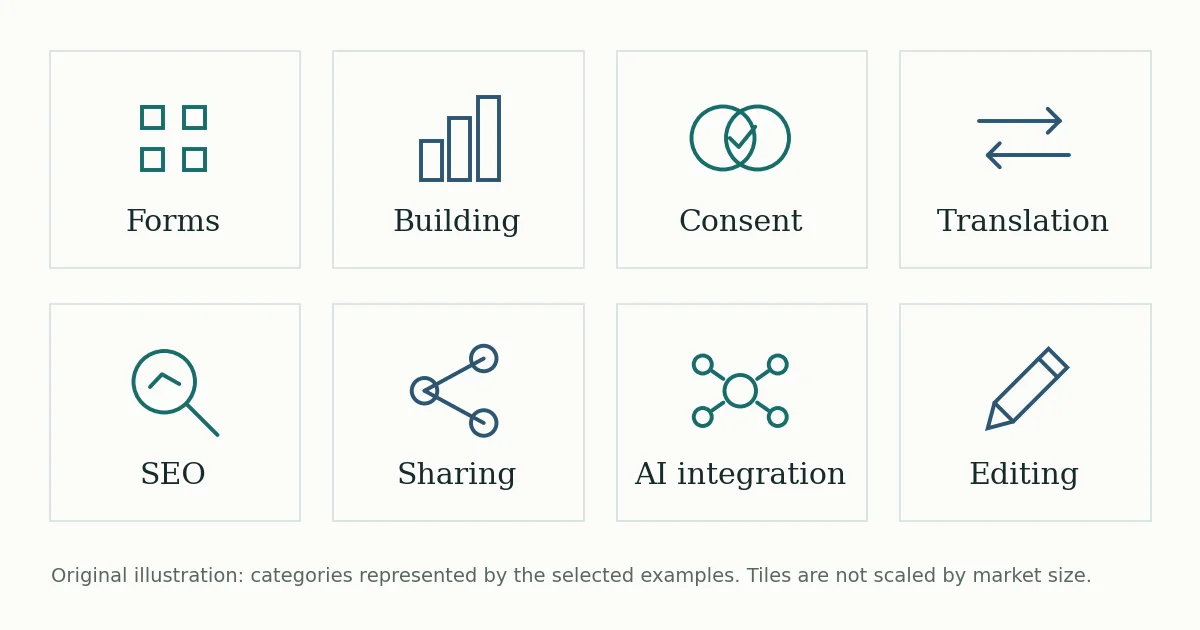
I selected the ten plugins below to show the variety in this group. They cover forms, website building, consent, translation, SEO, social sharing, performance, editing and AI connections; they are not simply the ten largest.
37 listings at 1,000+ installs. Nine at 10,000+. These are current reported floors within the eligible six-month directory cohort, not measured journeys from zero. A recent listing can represent an established product or a rebuild.
| Plugin | Job it addresses | Directory added | Active installs | Source |
|---|---|---|---|---|
 FormLayer FormLayer |
Forms | 26 May 2026 | 100,000+ | WordPress.org |
 Spectra Blocks Spectra Blocks |
Block-based website building | 8 Jul 2026 | 60,000+ | WordPress.org |
 Cookiez Cookiez |
Cookie consent | 18 May 2026 | 50,000+ | WordPress.org |
 Universally Universally |
Translation | 14 May 2026 | 30,000+ | WordPress.org |
 BeyondSEO BeyondSEO |
SEO | 25 May 2026 | 10,000+ | WordPress.org |
 ShareMyPost ShareMyPost |
Social sharing | 13 Jul 2026 | 10,000+ | WordPress.org |
 xSpeed xSpeed |
Performance and caching | 27 May 2026 | 10,000+ | WordPress.org |
 FrontEdit FrontEdit |
Frontend content editing | 20 Jul 2026 | 2,000+ | WordPress.org |
 WSP MCP WSP MCP |
AI connections to WordPress | 13 Jul 2026 | 2,000+ | WordPress.org |
 Cowboy MCP Cowboy MCP |
AI site management with undo | 3 Jul 2026 | 1,000+ | WordPress.org |
Table: WPInsight snapshot, 25 October 2026. Active installs are WordPress.org’s rounded public floors, not exact counts. Directory-added dates are not launch dates.
What I like about this list is how ordinary some of the jobs are. People still need forms and translation, even as AI site management finds its place. A focused improvement to something people already do may be enough to give you a product worth exploring.
Before choosing a product to compare yourself with, look at where it started. For example, Spectra Blocks describes itself as a rebuild of Spectra, while Cookiez is published by Elementor. A recently added directory page does not make every product equally new to the market.
Four examples I’d spend time studying
ShareMyPost: a familiar job, visible milestones
ShareMyPost is a social-sharing plugin with inline share bars. Its retained install history first shows the 1,000+ bracket on 22 July, 5,000+ on 9 August and 10,000+ on 2 September.
The progression is what catches my attention: several milestones in the available history, for a product addressing a familiar website task. That gives me more to investigate than the final install number on its own.
At both our September and October comparison dates, though, it is still in the 10,000+ bracket. Movement inside that bracket is invisible to us. The next step is to read the product’s offer and user feedback, then decide what lesson, if any, applies to your own work.
FrontEdit: make an existing workflow easier
FrontEdit lets people edit supported block content where it appears on a page. Its focus is the content-update workflow, rather than asking people to rebuild their website.
The retained history first shows 2,000+ installs on 17 August. Both 25 September and 25 October still show 2,000+. Here we have adoption at a smaller scale, with no visible change in the reported bracket over the latest month.
Editing a heading or replacing an image sounds like a small job. But if it remains awkward for the person doing it, that is worth a developer’s attention. FrontEdit gives us a reason to investigate that everyday problem. How much customers would pay to solve it is a separate question the install data cannot answer.
WSP MCP: a newer workflow finding adoption
WSP MCP connects WordPress with AI assistants through a standalone plugin. Its documentation says no companion adapter is required.
In the matched install observations, WSP MCP moves from 1,000+ on 25 September to 2,000+ on 25 October. Its downloads also move upward: from 4,484 in 26 August–24 September to 8,136 in 25 September–24 October.
Both the reported install bracket and the separate download series have moved. That narrows the research: look at what the plugin makes easier to connect and use, then read the questions people still ask. We cannot identify the feature that caused adoption from these numbers alone.
Cowboy MCP: a specific concern inside the same category
Cowboy MCP also connects AI assistants to WordPress, with undo and checkpoints prominent in its description. It gives us a second example in the category with a distinct product emphasis.
Its reported floor moves from 400+ on 25 September to 1,000+ on 25 October. Looking closer, the retained series shows 900+ on 12 October and 1,000+ on 13 October. Its two 30-day download totals are 2,270 and 6,405.
For me, the interesting question here is what makes people hesitate when adopting a new workflow. Undo and checkpoints address a specific concern, although these numbers do not establish that undo caused the changes. That product emphasis is worth examining alongside the install count.
Watch the same dates, not just the biggest number
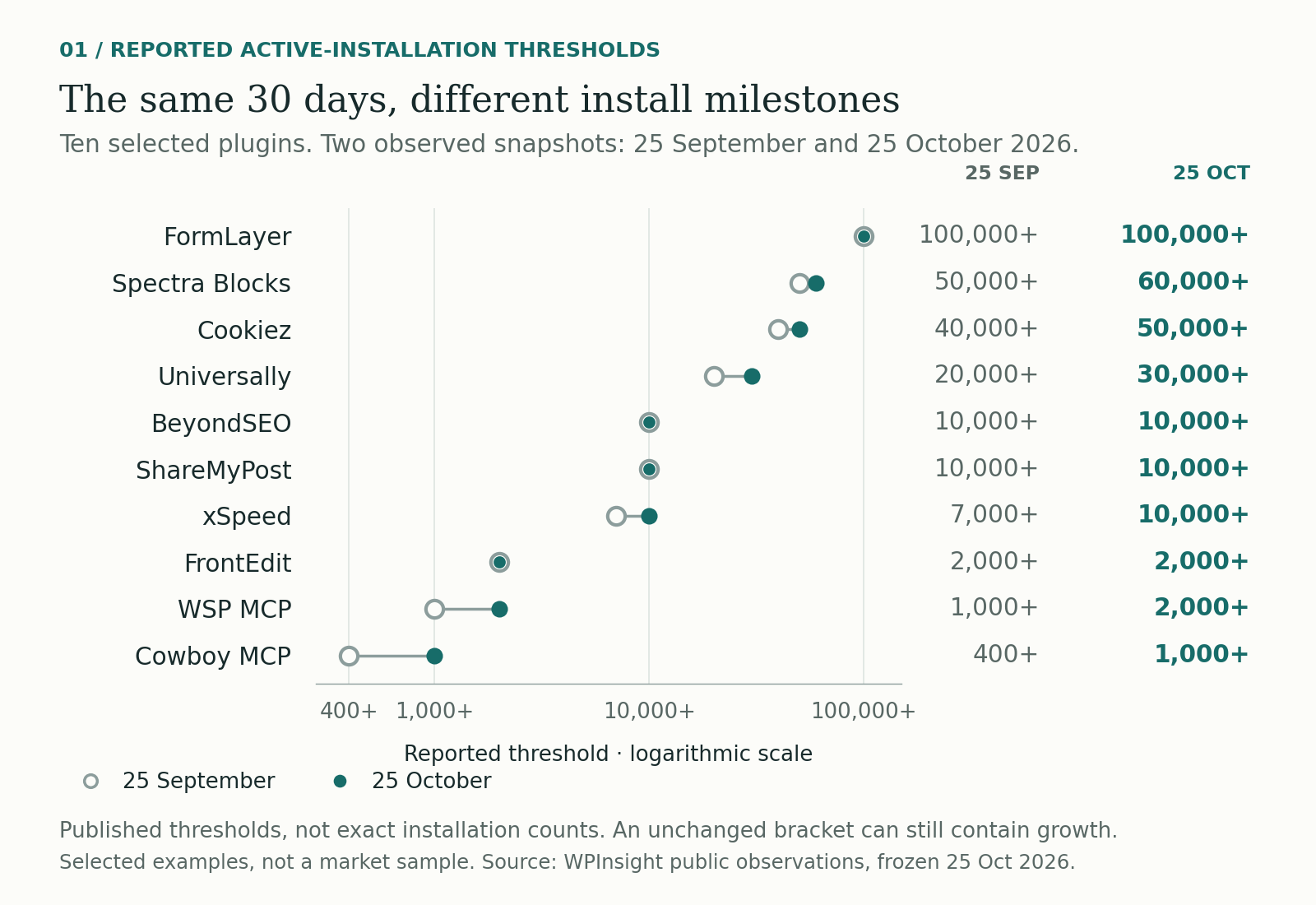
The chart compares all ten examples with actual observations on both 25 September and 25 October. Six show a higher reported install bracket; four remain in the same bracket.
At the larger end, Spectra Blocks moves from 50,000+ to 60,000+, Cookiez from 40,000+ to 50,000+, and Universally from 20,000+ to 30,000+. At a smaller scale, xSpeed moves from 7,000+ to 10,000+, WSP MCP from 1,000+ to 2,000+, and Cowboy MCP from 400+ to 1,000+.
The shared dates give this comparison a consistent frame. Comparing one plugin’s first observed week with another’s entire available history would tell us very little about how they moved over the same period.
The plus signs matter. A change from 40,000+ to 50,000+ shows that the reported bracket changed. It does not establish exactly 10,000 additional installations or exactly 25% growth. Likewise, an unchanged bracket is too coarse to prove that adoption was flat.
Use this view to spot a milestone that deserves attention. Then keep watching: a single comparison is a starting point for investigation.
Downloads add another layer
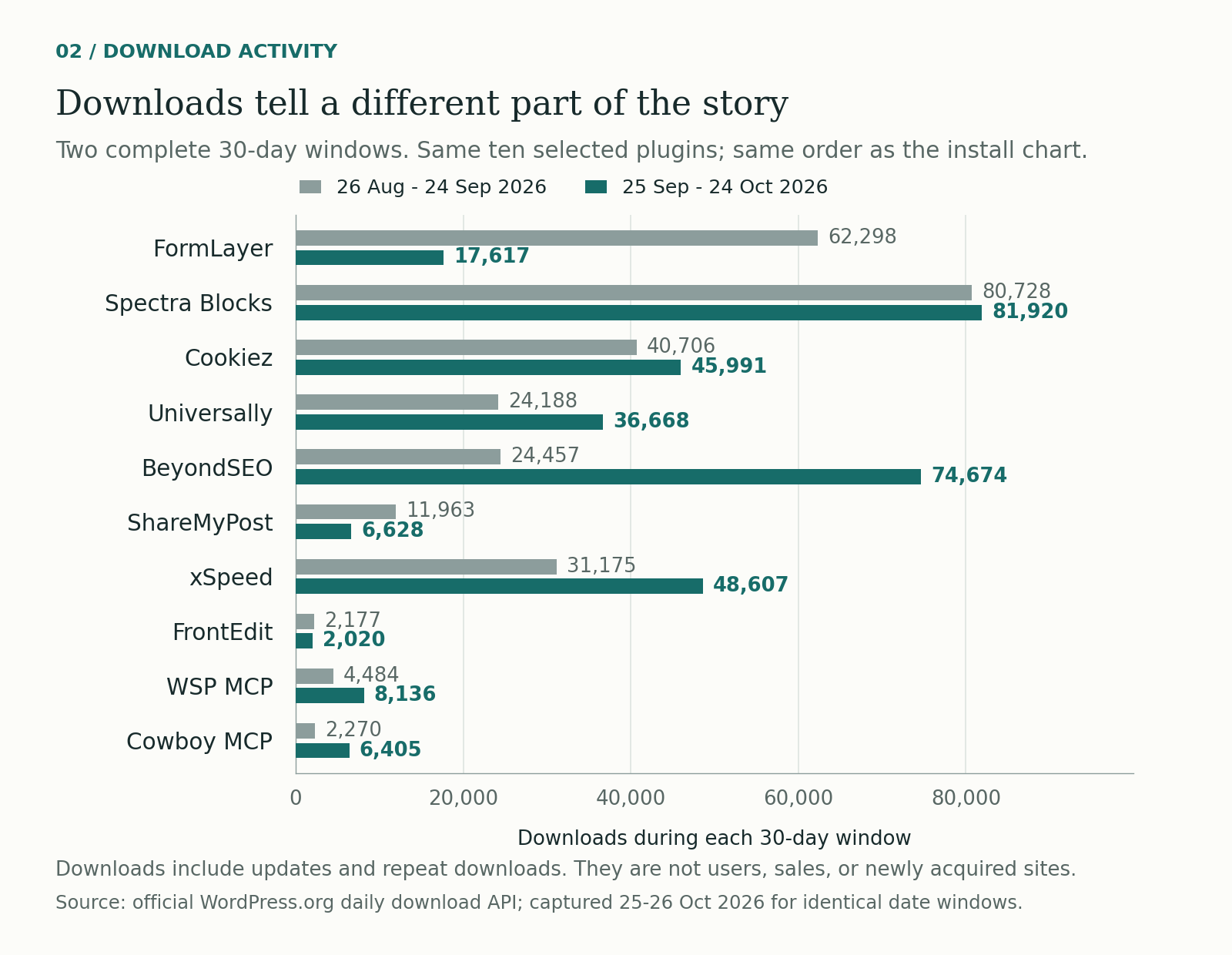
The download comparison uses two complete 30-day windows: 26 August–24 September and 25 September–24 October. Every example has all 60 required daily observations.
BeyondSEO records 24,457 downloads in the first window and 74,674 in the second, an increase of 205.3%. Yet its install floor is 10,000+ at both comparison dates. FormLayer’s downloads move in the other direction, from 62,298 to 17,617, while its install floor remains 100,000+.
WordPress.org’s daily download data includes updates and repeat downloads, so even a large change cannot be translated directly into new users, new installations or customers.
This is where I would open the daily history and check release activity alongside the installs. One sharp day and several weeks of elevated activity raise different questions. The mismatch between the metrics is itself a reason to look closer.
Maintenance deserves a separate look. Metadata retrieved on 26 October shows latest-update dates from 22 September to 21 October across the ten examples. Those dates tell us when a directory update was last recorded. Assessing release frequency, product quality or the reason for adoption takes more evidence.
How I’d use the data before building
The public release of WPInsight gives other founders and developers access to this kind of research: public plugin profiles, comparisons, install histories, downloads and ranking signals in one place.
This is the part that matters to me as a builder: turning a broad impression about WordPress into a short list of products and questions worth your time. The public data helps you choose where to look. Your product knowledge helps you make sense of what you find.
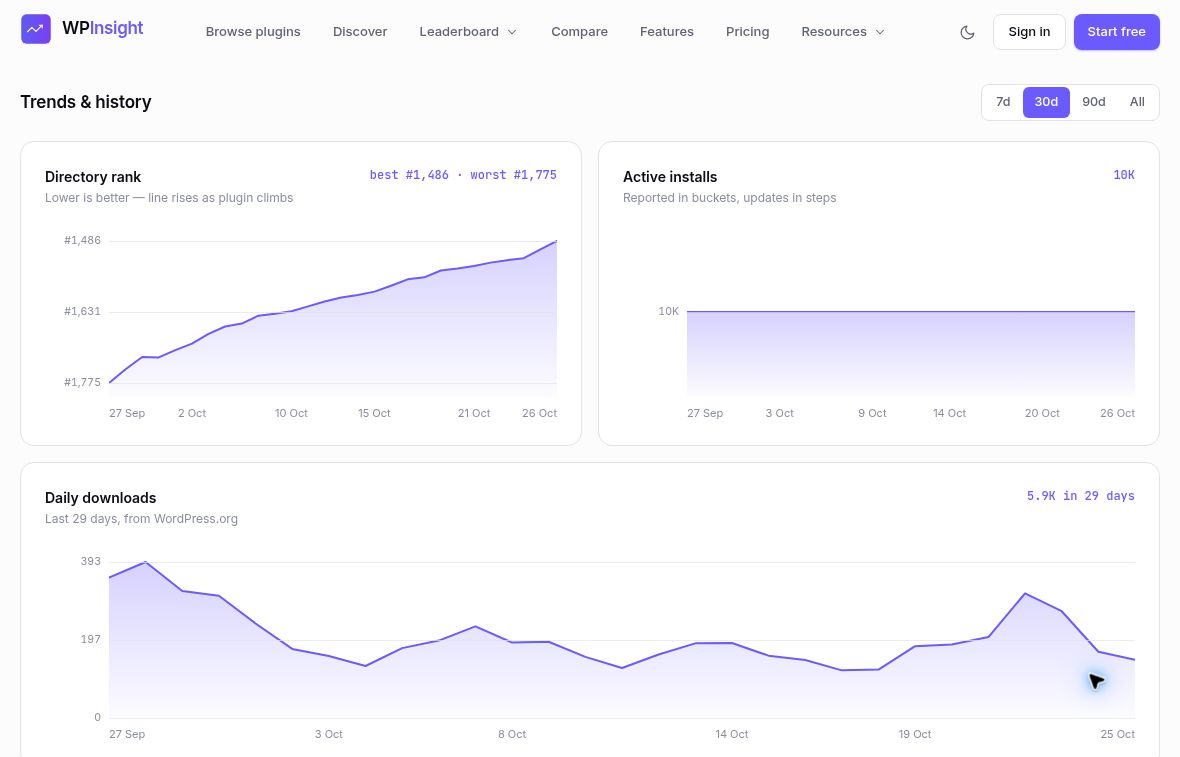
I would work through it in this order:
- Start with one customer job. “Help a client update page content” is a better research starting point than “find a growing plugin category.” Choose a few products addressing that job, including some near your own scale.
- Build a dated baseline. Record their directory-added dates, install brackets and latest-update dates. Keep the observation dates too. You need to know whether a number is current and what period you are comparing.
- Look for milestones and mismatches. Which install brackets changed? Which download totals moved while the bracket stayed the same? These differences help decide where to read the history more closely.
- Keep ranking signals separate. Directory rank and positions for particular WordPress.org search terms answer different questions. A better rank is not proof that your own installs increased. Follow the relevant terms and compare the movement with the other evidence.
- Read the product, not only the chart. Look at the description, setup instructions, changelog, reviews and support questions. Treat a recurring complaint or confusing step as a hypothesis to verify with people, rather than proof of a ready-made business.
- Test one improvement and measure your own result. A clearer explanation, simpler setup or better answer to a support problem can be a sensible experiment. Your own activation, retention and revenue data should decide whether it helped the business.
WPInsight gives that process structure, so you can repeat it as the evidence changes. Public totals alone cannot explain why a competitor grew, and the platform cannot make your experiment succeed. That still depends on the builder’s judgement and the results.
Turn the data into a useful next step
Once you have a few relevant comparisons, bring the question back to your own plugin: what deserves attention now?
That is where a WPInsight account and its MCP connection become useful. You can start tracking one plugin and five keywords on the free plan. Connecting an AI agent requires a paid WPInsight workspace, a compatible client and authorization to your account. Start with read-only access using the MCP setup guide. Check the current plan details.
Here are three example prompts to try:
1. Compare your plugin with relevant peers
Compare [my-slug] with [peer-a] and [peer-b], already tracked in my workspace. Summarize their install brackets, 30-day download trends, ratings and directory positions. Flag missing history.
Choose peers that make the comparison useful for your stage, instead of defaulting to the biggest plugin in the directory. Keep the download distinction in view: these are activity signals, including updates and repeats, not new users. Available history and plan limits apply.
2. Find a search opportunity worth testing
Find relevant keywords where competitors outrank [my-slug]. Show the measured positions and suggest one accurate listing improvement to test.
The keyword tools give the agent measured ranking evidence. Use it to review how clearly your description explains a relevant use case. Make an appropriate change yourself and watch the subsequent results; the gap alone does not explain why a competitor ranks higher.
3. Decide what needs attention this week
What changed this week in my tracked keyword rankings and low-star reviews? Suggest one issue to investigate, with the supporting evidence.
A confusing feature or a complaint that keeps coming back might deserve a closer look. Ask the agent to separate what it observed from what it is assuming, and to say where the history is insufficient.
The benefit is a better routine for research and decisions. MCP does not guarantee growth or automatically edit your WordPress.org listing. You still decide what to build, test and ship.
Still room, if you solve something specific
Developers continue bringing products to the directory. The official Plugins Team update on 19 October reports 1,363 requests and 942 approvals. Those are separate activity counts, not an approval rate or proof of customer demand.
What makes me optimistic is the adoption history we can actually examine: progress at the 1,000+ bracket as well as at 50,000+, across familiar jobs and newer workflows. There are lessons to investigate at more than one scale.
I would keep building. Start with people whose work is still harder than it needs to be, understand their alternatives, and choose a realistic comparison. Then ship something useful and watch what happens. That is where these observations can lead: to a specific problem you are ready to test.
Methodology and sources
Snapshot and coverage. The six-month window is 25 April–25 October 2026, inclusive; the cohort query was captured at 22:49 UTC on 25 October. Of 13,919 mirrored listings with known source-added dates in that window, 8,384 met the active/fresh-observation criteria: observed within seven days. The other 5,535 were excluded for stale or unknown observations. Among eligible rows, 8,347 were below 1,000, 27 were at 1,000–4,999, one at 5,000–9,999, and nine at 10,000+. Uneven coverage, mixed listing ages and selected examples prevent a representative startup success-rate claim. This analysis does not establish aggregate WordPress growth or profitability.
Histories. WPInsight’s retained public install observations are rounded reported floors, not estimated installs. Milestone dates mean first observed in the available history, not the exact day adoption occurred. Missing dates remain missing. The paired chart uses returned observations on both 25 September and 25 October. Both charts cover the same ten examples as the comparison table.
Downloads, updates and ranks. Download totals sum WordPress.org’s daily API rows for the stated complete windows and include updates and repeat downloads. Latest-update metadata was retrieved separately on 26 October. Directory ranks are relative positions, not install growth. No customer, billing or private workspace data is used.
Public pages are live and may now show different values.